Reporter: A Bold Font for Creative Campaigns
It’s 9 PM on a Thursday, and the team is finalizing the visuals for a seasonal sale campaign. The main graphic needs to pop across social media, email, and digital ads. We’ve tried a few options, but nothing quite clicks. Then I remember Reporter—a thick, brushed lettering font that feels both modern and timeless. It’s one of those freebies that never disappoints.
What Makes Reporter Stand Out?
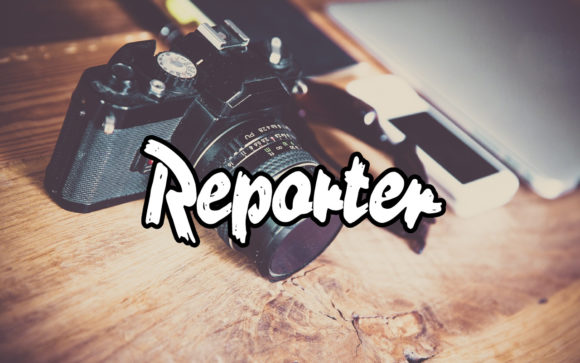
Reporter isn’t just another font. Its thick strokes and subtle brush effects give it a handcrafted, editorial feel. The characters are well-proportioned, with a balance that makes it versatile for both headlines and decorative text. It carries a confident, approachable personality—perfect for campaigns aiming to connect with audiences on a personal level.
The font’s visual style leans into a premium aesthetic without being overly ornate. It works well in both light and dark backgrounds, and its weight helps it stand out in fast-scrolling feeds or small thumbnails. Whether you’re designing a YouTube thumbnail or an Instagram post, Reporter adds a touch of sophistication that doesn’t compromise clarity.
Reporter in Action: A Real Campaign Example
For a recent online course launch, we used Reporter as the headline font across multiple assets. The title “Master Your Craft” was set in Reporter, paired with a clean sans serif for the supporting text. The result was a striking contrast that guided the viewer’s eye while maintaining a cohesive brand voice.
We also applied it to a series of Pinterest pins promoting a productivity toolkit. The boldness of Reporter made the key messages—like “Boost Your Focus” or “Stay Organized”—immediately visible. Even in smaller sizes, the font retained its legibility, which is a rare quality in many display fonts.
Best Use Cases for Reporter
Reporter shines in short, impactful text. It’s ideal for callouts, logos, headers, and promotional labels. For example, using it in a webinar banner or a product teaser can instantly elevate the visual appeal without overwhelming the design.
It also works well in branded template packs, where consistency is key. When paired with a simple serif or sans serif font, Reporter can create a balanced and professional look. This makes it a great choice for email banners, landing pages, or social media content series.
However, it’s not the best fit for long paragraphs or dense information. In such cases, a more readable typeface would be preferable. Similarly, formal corporate communication might benefit from a more restrained font, unless the brand’s identity leans toward a more creative or artistic direction.
Designing with Reporter: Tips for Digital Campaigns
When working with Reporter, keep in mind how it appears on mobile screens. Its thick strokes help it remain legible even at smaller sizes, but it’s still important to test it in real-world scenarios. For instance, if you’re adding text to a YouTube thumbnail, make sure the font doesn’t get lost against busy backgrounds or low-resolution images.
On dark backgrounds, Reporter maintains its readability, but on light ones, the contrast can be adjusted for better visibility. For image overlays or social media posts, keeping the text area limited and the font size consistent will ensure it remains effective across different platforms.
Pairing Reporter with Other Fonts
Reporter pairs well with a variety of typefaces. A clean sans serif like Montserrat or Open Sans can provide a modern counterbalance, making the design feel more structured. A classic serif font like Georgia or Playfair Display can add elegance, especially for editorial or lifestyle campaigns.
For a more creative or playful vibe, pairing it with a script or handwritten font can enhance the overall aesthetic. Just be careful not to overdo it—using too many fonts in one design can dilute the message and confuse the audience.
Font Details and Practical Considerations
Before using Reporter in any campaign, check the available styles, weights, and file formats. Some free fonts may have limited character sets or missing ligatures, which can affect the overall look. Also, ensure that the licensing allows for commercial use if you’re planning to incorporate it into client projects, merchandise, or digital products.
If you’re building a branded template pack, having access to alternate characters or stylistic sets can add flexibility. Reporter’s multilingual support is a plus, especially if your campaign targets international audiences.
Overall, Reporter is a reliable addition to any designer’s toolkit. Its unique blend of strength and elegance makes it a go-to choice for campaigns that need to stand out without sacrificing clarity or professionalism.