Use Burcaster for Bold Campaigns
It’s 9:15 a.m. and the team is finalizing the visual assets for the new product launch. The client wants something eye-catching, something that stands out in a sea of digital noise. I open up the design file, scroll through the mockups, and realize we need a font that feels both modern and personal. That’s when I remember Burcaster.
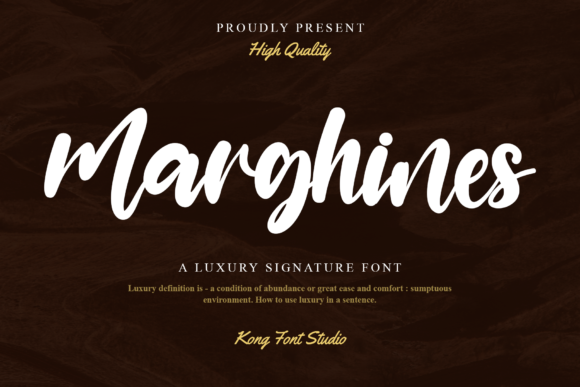
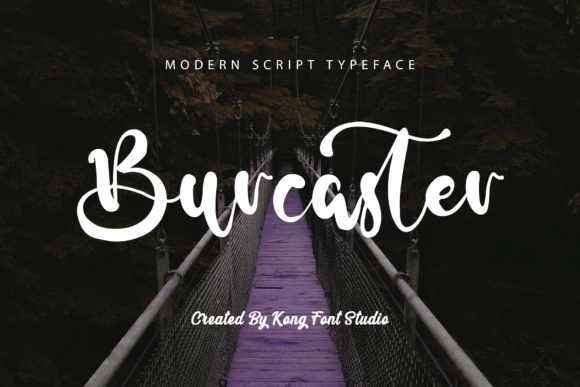
Created by Kong Font Studio, Burcaster is a handwritten script font with a playful edge. It’s not just a typeface—it’s a mood booster. The curves are smooth, the strokes feel intentional, and there’s a certain warmth to it that makes text feel like it’s being written by hand. It’s perfect for campaigns that want to feel authentic without sacrificing style.
Why Burcaster Works for Digital Campaigns
When designing for social media, thumbnails, or email banners, clarity and impact matter. Burcaster isn’t just decorative—it’s functional. Its legibility on small screens and mobile previews makes it ideal for headlines, callouts, and short messages. Whether you’re creating a sale announcement for an online shop or a teaser for a webinar, Burcaster adds personality without overwhelming the message.
Imagine using it for a seasonal promotion. A bright red background, a bold headline in Burcaster, and a simple tagline in a clean sans serif. The contrast is sharp, the message is clear, and the font adds that extra touch of creativity. It’s the kind of font that makes your campaign feel more human, more approachable.
Real-World Applications of Burcaster
Let’s say you’re working on a Pinterest campaign for a lifestyle brand. You need pins that grab attention but still feel elegant. Burcaster can be used for the title text, adding a sense of movement and energy. Pair it with a serif font for body copy, and you have a balanced, professional look that still feels fresh.
For YouTube thumbnails, Burcaster can make your video titles pop. On a dark background, its light strokes stand out. In a fast-scrolling feed, it’s one of those fonts that makes people pause. It’s not too flashy, but it’s memorable. That’s what makes it great for campaign consistency across multiple platforms.
When designing for web banners or landing pages, Burcaster can be used as a header font. It works well for short phrases like “Limited Time Offer” or “Join the Movement.” The font’s unique character helps reinforce the brand’s voice, especially if the brand is targeting a younger, creative audience.
Best Practices for Using Burcaster
While Burcaster is versatile, it’s best suited for display text, headlines, and logos. It’s not ideal for long paragraphs or body copy. For readability, keep text size above 24px, especially on mobile screens. When using it on dark backgrounds, ensure there’s enough contrast to maintain legibility.
Pairing Burcaster with a clean sans serif like Montserrat or Poppins can create a strong visual hierarchy. The contrast between the script and the sans serif adds depth and structure. If you’re going for a more traditional look, pairing it with a serif font like Lora or Playfair Display can give your design a polished, editorial feel.
Before using Burcaster in any campaign, check the available styles, ligatures, and alternate characters. These features can add variety and prevent repetition in your designs. Also, make sure to review the licensing terms—Burcaster is part of the Freebies category, but commercial use might require additional permissions depending on the source.
Using Burcaster in Your Workflow
During a recent campaign for a small online store, I used Burcaster for the main headline on the homepage banner. The font added a friendly, approachable tone that matched the brand’s voice. For the email newsletter, I used it for the subject line and a promotional quote. The result was a cohesive, visually engaging campaign that felt consistent across all touchpoints.
Another time, I used Burcaster for a series of Instagram posts promoting a new course. The font worked well for the captions and the overlay text on images. It gave the content a personal, handwritten feel that resonated with the target audience. The engagement rates were higher than usual, which made me appreciate how much a good font can influence user interaction.
Whether you’re working on a product launch, a seasonal sale, or a branded content series, Burcaster offers a unique blend of style and functionality. It’s a font that speaks to both the creative and the strategic side of design. And as a free font, it’s a valuable addition to any designer’s toolkit.
So next time you’re brainstorming a campaign, think about the message you want to send. Is it bold? Playful? Authentic? Burcaster might be the font that helps you get there. It’s not just a typeface—it’s a tool for making your campaign stand out, one letter at a time.